Why Olympus?
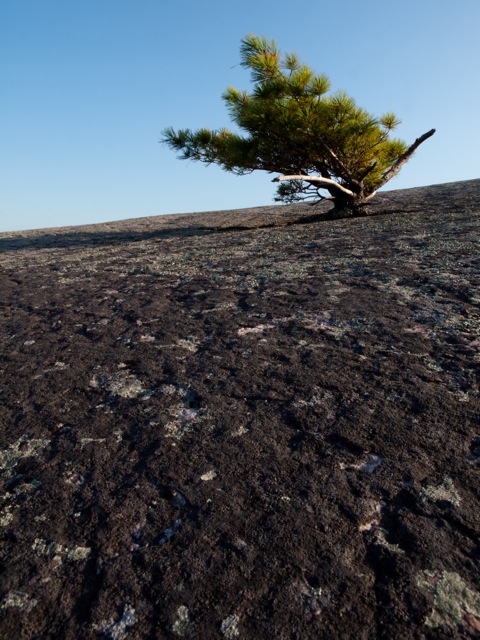
Natural Bonsai (ZD 12-60mm; E-30)
Every once in a while I drag myself over to the dpReview Forums and take a look at the Olympus SLR Talk. I am constantly struck by the number of trolls who take pot shots at Olympus and the 4:3s system. In fact, right from the very first 4:3s announcement posters have sniped at Olympus:
- Olympus cameras are not “professional” enough
- the lenses are too expensive
- the sensor is too small
- yada yada yada
which is all bogus when you get right down to it. Even dpReview had a thing against Olympus (which they have since toned down – and for good reason). It’s as if individuals in the Canikon group have such a superiority complex that they just need to bully around everyone else. I don’t get it? You shoot with what you like and let us create photographs with the equipment we prefer. Is Canikon better if its more expensive? Is it better if it doesn’t have the feature set that attracts us to Olympus? Is Canikon better if I can’t get the lenses I want in a size and price that suits me? Do I go and bash Canikon for this? The answer to all of the above is a simple “no”.
It’s as if the Olympus snipers are a bunch of conformists: they feel slighted because not everyone in the world thinks like them so they need to vent their frustration by picking on the ones who don’t share their views. Wake up folks – Olympus has never had the market share of Canikon. Does that stop them from making fine cameras and even finer optics? No. It’s not unlike Apple computers – does a 5% market share ever get them down? I don’t think so, otherwise they would have cheapened their product to increase market share. The most popular isn’t always the best for everyone.
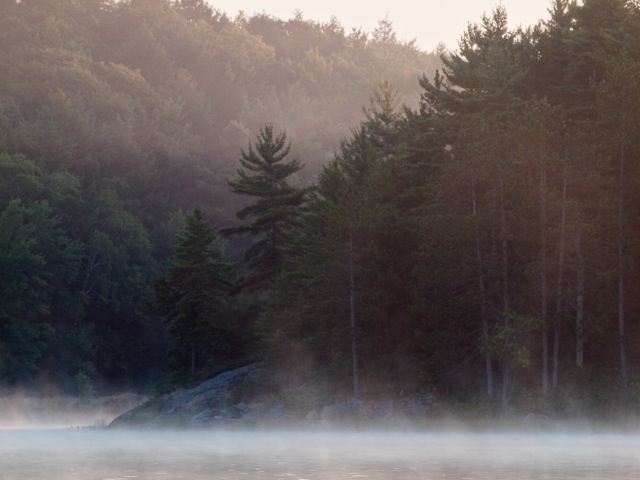
Dawn (ZD 50-200mm; E-30)
Years ago, I, too, bowed to the Nikon god – for years I owned two FMs and an F2 plus Nikkor lenses: 24mm; 50mm; 85mm; 200mm Micro-Nikkor; and a 300mm f/4.5. I loved using the equipment. The FM especially was small enough for me to comfortably hike, backpack and canoe with it. We were inseparable; except when my photography took me to Pentax 67. I couldn’t afford to own both, so I traded in all my Nikon gear for what I believe is the best system I’ve ever owned – at least for me and my style of shooting.
I am happiest shooting on a tripod – slow and methodical an hour before sunrise – that’s me! Learning this about myself led me to 4×5 – a gorgeous Zone VI wood field camera with 90mm, 150mm and 210mm lenses. In a word… Zen. So what’s this got to do with Olympus…
During the same time I met the women who would become my wife and she was using her Dad’s Olympus OM-1 from the early 1970s (this was in the late 1980s). I fell in love again, not just with her, but with Olympus. I say “again”, because I took my first photos with my Dad’s Olympus OM-1 back in the mid-1970s. The OM bodies were the epitome of 35mm photography – small and lightweight with the largest viewfinder available – nothing came close to it back then and nothing comes close to it now. The lenses were wonderfully sharp, made with precision and equally small and lightweight. I ended up adding an OM-3 and an OM-4 to my kit along with Zuiko 24mm, 35mm, 50mm, 90mm Macro (Tamron), 100mm, 20omm and a 300mm f/2.8 Tamron. All were wonderful lenses. Why the Tamrons? I’m a realist – I simply couldn’t afford the equivalent Zuiko lenses (nor could I afford the equivalent Nikkor or Canon lenses!).

Tree Fungus (ZD 50-200mm; E-30)
Was the OM system a professional system – sure it was. Olympus never slowed me down. Was it ideal for everyone? No, and it never captured market share like Canon and Nikon. Did that ever stop Olympus from making excellent equipment? No – the equipment was always first class. You see, photography is not defined by Sports Illustrated photographers. Not everyone needs 600mm f/4 lenses on cameras with a bazillion frames per second. I’m an artist; I assemble my images from elements in the landscape. I don;t ush a button and hope to capture something.
So, what next? I had all this film gear and the world was going digital – what to do? Which system to choose – it was wide open for me because Olympus had stated that their new 4:3s system would not support their film camera lenses. Man I was pissed. All that money wasted – there was NO WAY I would buy into Olympus.
I checked all the competitors to see how well they matched up to my requirements and soon discovered that only Olympus make a wide angle zoom that went to 28mm f/2.8 and wasn’t huge in glass or hugely expensive. And, as a bonus, I could own a 400mm f/3.5 (so coveted through the 1980s and 1990s) as part of a second zoom that would help me cover the entire range from 28mm to 400mm. Matched to an E-1, I had the ideal system for my style of photography – and it all fit into a waist pack with room to spare.
You see, what everyone seems to miss is that photography is all about the photographer. The equipment comes secondary. What you need is the highest quality lenses you can afford that permits you to do the kind of photography you enjoy doing. That’s why I chose Olympus back in 2004 and why I have stuck with Olympus to this day. Especially since they came out with the Zuiko Digital 12-60mm f/2.8-4. What a superbly thought-out focal length range and aperture. I do 90% of my shooting with this lens now.
Could I create better shots with Canon or Nikon? Perhaps, perhaps not. If I’ve “missed” a shot, it’s not because of the equipment. Have I ever lost a job or a photo competition because I use Olympus? No, in fact when Canikon people see my prints they marvel at the quality and want to know which model of Canikon I use. Has Olympus hampered my growth as a photographer? Not in the least.
I have never felt the need to conform to what others have. Nor have I been swayed by what the camera salesman or adverts want to convince me of. Perhaps that’s why I chose Olympus – it tells the world that rightly or not, I can think for myself because I’ve chosen a system because of its inherent, proven qualities and how well that system fits to my style of photography. Do I expect Canikon exponents to understand my decision? No, they are not me. Let’s just agree to disagree and get on with our photography.

Trees, Morning Mist, Bruce Peninsula, Ontario (ZD 12-60mm; E-30)
Reality Check
I just read an unbelievable post on dpReview…
Format Wars?: http://forums.dpreview.com/forums/read.asp?forum=1022&message=33831269
Here is my response… (also found on dpReview):
——-
I know I’m going to take a lot of heat over my post below, but here goes…
Jim Stirling’s post is well thought out and certainly is all true, but the reality of history and context are completely missing.
I can’t believe his original “Format Wars?” post – how did we ever take photos before this guy came along? Three camera systems needed to do photography? – give me a break! I want to say “More money than brains” except that he can probably write off his equipment against income.
Before digital…
- * How did National Geographic ever produce the kind of images they did with just one system and numerous bodies. It’s a rhetorical question because I know how they did it: some of it was supreme darkroom work, but really, the photographers (not he cameras) were the basis of the great images they produced. Yes, they used specialised equipment for some of the well-publicised shots, but for the vast majority they were using out-of-the-box film cameras and lenses.
- How did Karsh or Adams ever cope with an 8×10 camera and glass negatives whether it was in front of dignitaries or up a mountainside?
- How did any one of a thousand photojournalists ever capture such amazing images of momentous occasions? Not to mention the legion of wedding photographers who worked for years creating truly memorable images.
You would think that this would all be impossible with what Jim Stirling has written.
I realise I’m referring to days gone by, but we need to stop and think that if they could do amazing work with simple, manual mechanical film equipment then maybe it’s not the equipment, but the photographer! IQ has more to do with capture technique (exposure!) and post-capture processes than the sensor. And even more importantly, its being in the right place at the right time with the right knowledge to take advantage of the situation – equipment actually comes secondary – unless you are of the techno ilk that thinks equipment is supreme; then your photos will be technically perfect but still not be compelling.
Bottom Line: The vast majority of people reading these posts are not cutting edge professionals who can write off their expenses against income – they are regular people on a limited budget who just want to learn and improve upon their photography. To get great pictures buy any dSLR system and get out there and shoot. Then spend some time analysing not just your images, but those of others. Ignore what system was used and concentrate on what focal length was used and why and how the photographer made use of visual design elements and “the moment” to create a compelling image.
In fact, if posters spent less time posting and more time photographing and looking at, really analysing and discussing compelling photographs , we would all be better photographers!
Tanzania Book – just in time for Christmas!

Tanzania
I’m just putting the finishing touches on my new book: Tanzania. It is a fine art book of photographs portraying the grandeur of Tanzania, its wildlife and some of the people who live there. My Introduction reads:
Using words alone, I find it impossible to accurately describe a wondrously complex country like Tanzania. While the photographs in this book portray the “Northern Circuit” they are representative of much of the country.
In every way it is a beautiful place, but it is also depressing, straight-forward yet enigmatic, inspiring yet frustrating, challenging yet easy-going. The romantic in me celebrates the wide-open landscapes and wildlife that are little changed in centuries – what Canada once was. The realist in me sees a people hampered by challenges much greater than their economy can solve. Yet Tanzanians are filled with the joy of community and friendship and a joie de vive unparalleled here in Canada. I lament the rapid changes fraught with conflict and tension, yet I yearn for Tanzanians to live their lives free of the afflictions that cause such hardships.
As a writer, this is as far as I go; I hope my photographs can more clearly reveal the grandeur of this great and wondrous country.
– Terry McDonald
November 2009
Tanzania is a beautiful, limited run, 8.5 x 11.25″, 46-page hard cover book with dust jacket and costs just $115 – including delivery – an ideal Christmas gift for anyone who appreciates great photography and the wonders of Africa.
Featured in the book are images Mount Kilimanjaro, Arusha National Park, Tarangire National Park, the Rift Valley including Ol Doinyo Lengai and Lake Natron, Ngorongoro Crater Conservation Area and Serengeti National Park. As well, I’ve included photos from the bomas of our Maasai friends Kalanga and Baraka showing their extended family. This was a very special time and place for us as their homes are in the real porini (wilderness) north of Monduli near Kitumbeini and the Matisiwi Escarpment – a spectacular area.
Anyone who has travelled to Northern Tanzania would not only recognize the places shown, but will begin to see these wonderful lands in a new light.
iWeb Update
I have been doing some researching on iWeb and how well iWeb pages can be seen by search engines. Basically they are invisible without some added work like adding a sitemap and adding your site to Google Webmaster Tools. This research has led to further work on my site turning images into text as much as possible. Specifically:
- every time text is given a shadow, iWeb turns it into an image which makes the text invisible to search engines – turn off shadows;
- to check which elements on your page are text or images, go to iWeb > Preferences and check the box for “Show text imaging indicator” – this is essential for doing a thorough job;
- whenever an image is added inline to text, the whole thing is turned into an image. – remove images from inline;
- lastly, when a text box is hyperlinked, it turns into an image – hyperlink the actual text by selecting it.
More and more search engines are basing their rankings on actual page content rather than meta tags in the header. This means an app like iWeb SEO Tools is becoming less and less helpful. What really matters is what’s on the page. So, make sure you have a s much text as possible by turning off shadows except where they are really needed – especially for things like navigation bars and links since they often carry important keywords.
Register your site with Google WEbmaster Tools and a basic sitemap by following the instructions at iWebfaq.org.
iWeb for creating great websites
 I have been working hard over the last month updating my website: luxBorealis.com. Have a look if you haven’t done so lately. Many people have asked how I created such an interactive website with lots of photos. They wonder how I could ever have time to do all that.
It’s easy… I use iWeb. “What’s iWeb?” is the next question. And I tell them about this great app that comes free with every Apple Macintosh computer as part of their iLife suite. then sounding somewhat chagrined, they say “Oh, your a Mac user.” “Is there anything like that for Windows?” Not that I know of…
Listen, iWeb isn’t perfect. It is easy to make webpages and do all kinds of cool things, but it’s not great on maintenance and it’s lousy for blogs (at least, I found it clunky although I know others who swear by it, but then they work directly through MobileMe; I don’t). “What’s all this MobileMe stuff?” you ask. Let me back up…
The things I love about iWeb are:
- I can make a very cool webpage in minutes – colours, boxes, fonts – it’s free-form design without the constrictions of typical web authoring software. It’s as easy as word processing – well Mac word processing which is so much more fun and creative than Office word processing. You see, Macs have fun and creativity built into every application they create. You can always tell a Windows/Office document from a Mac doc (whether it’s word processing, a presentation or a webpage). Mac creations are, well, creative, because Mac has made adding graphics and shadows and colours so easy. So it shows up in the work Mac people do.
- I can add photos directly from iPhoto (another Mac app that comes free with every Mac – very powerful photo library software with very good editing capabilities – more on iPhoto another time because it’s not the be all and end all, but then again, it’s free!!). When I add photos, they are already formatted for viewing as thumbnails, or in a slideshow – all with the click of a mouse. Actually, come to think of it, I can drag and drop images from almost anywhere onto a photo page and have iWeb give them structure. It really is a great app for photo galleries!
- I can add Google maps and Google Adsense links with only a few clicks.
- I can easily create my own page design. iWeb comes with dozens of great templates, but I’m a bit of a maverick when it comes to design. I like to tweak things which I can do with iWeb. At times, the pages try to revert (e.g. whenever I create a new textbook it defaults to the template’s text) but a few copy and pastes or style copy and pastes and I’m back to where I want to be. iWeb is actually far more flexible than most people realize – just take a look at my pages. Sure there are constraints, but remember – it’s a free app!!
- I have complete access to my font library – any size, colour or font I want. If I want shadows, I just click the checkbox for shadows then adjust them however I want. Fonts that don’t display properly on other computers are, for the most part, converted to graphics.
- It’s free. I have I told you yet? It’s free with every Mac. Sure Macs cost more to begin with so yo would expect some freebies, but the again, when you buy a Mac you don’t usually need to upgrade anything else because it comes with enough ram and a large enough hard drive and a decent video card and all the connectivity your need including wireless right out of the box. You see, Macs are cutting edge – they lead the industry in most aspects.
Things I don’t like about iWeb. Hey it’s not perfect, but it is free!
- As I mentioned above, iWeb is slow for maintenance and updating web pages. Because of the file structure, every time I create a change, I need to up more files then necessary and that takes time. If I make one small graphical change on a number of pages on a site (like I’e been doing recently) I really need to upload the whole shebang to avoid missing content.
- iWeb is the pits with search engine optimization (SEO). You cannot put in custom titles or metadata such as descriptions or keywords. I do this through Rage iWebSEO. It’s a great little app and it’s free. Why Apple doesn’t build this into iWeb is a mystery.
- iWeb is too tied to the MobileMe service – at least iWeb ’08 is which is what I’m using. Apparently, iWeb ’09 has an FTP client that allows more web freedom. That being said, I’m a MobileMe subscriber and love the ease of use, but uploading can be a bit slow sometimes. Also, some services with iWeb such as counters and comments are also only available if you upload directly to MobileMe – which is something I don’t do because I want to optimize my pages using iWEbSEO. So, I need to publish to a folder first, the run iWebSEO, the upload. Not the smoothest, but definitely worth it in the end.
- iWeb pages seem a bit bloated. They are big bits of code and it uses png file format for graphics (larger than jpgs), but I don’t have a workaround yet. Thank goodness most people are on broadband now.
- iWeb pages do not always zoom well. I can’t do much about this, either.
So I’m using iWeb and can’t really see an alternative in my future. I’ve tried Rapidweaver but it’s not wysiwyg enough for a visual guy like me. I’ve tried Shutterbug, but it seems too clunky for me. For years I made all my websites with Adobe GoLive. It has since been replaced with Dreamweaver which I really should learn but it seems overly complicated for what I want to to. I invested many, many hours into learning html and web authoring only to have that knowledge become obsolete. Rather than reinvesting that time, I’ve decided to use iWeb and get great-looking pages right out of the box.
Is this an advert for Macs? Well, yes and no. I’m not paid to say this. But I believe the more people know about a product, the better they can come to their own conclusions. This is what works for me; if it doesn’t work for you, well, that’s okay too.
 luxBorealis Blog