Making Photo Books with iPhoto
 I have had a wonderful experience as of late publishing two books using Apple’s free iPhoto application. It hasn’t been without a learning curve, but what I’ve found is that even simple books are very straightforward. Being the nit-picker I am, though, I’ve complicated my life by wanting details and customization that stretched iPhoto. But I have been very pleased at how iPhoto responded by stretching and accommodating the finessing I wanted. In fact, when I took one of my books to a local printer for a quote, they were astounded with the quality before I even told them how I made it and what it cost to make.
What I like about iPhoto…

Tanzania (Dec 2009)
Now, before I go too far, I should warn Windows users that iPhoto is only available to Mac users. It’s a shame, really, because I have yet to see a free photo library/catalogue app for Windows that even comes close to the capability of iPhoto. In fact, I have yet to see an inexpensive app (less than $75) that does what iPhoto can do. Furthermore, building on the success of iTunes, Apple could easily offer “iPhoto Windows” as a $10 or $15 app for download only. Anyway – back to the main event…
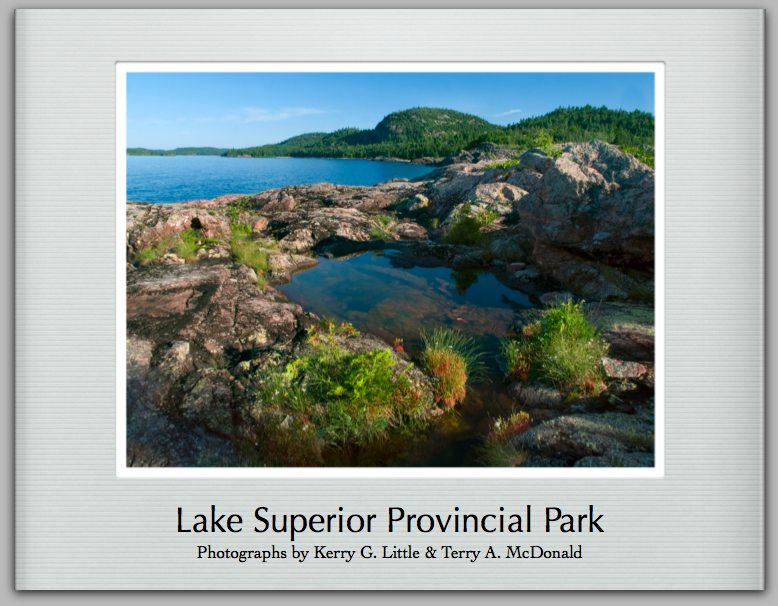
Lake Superior Provincial Park iPhoto book
I wrote an earlier blog about the usefulness of iPhoto here, but in summary I find iPhoto great:
- for easily and quickly finding photos;
- for cataloguing photos using events, albums and keywords;
- as a repository of high-quality, high-resolution jpegs of all my fine art and family photos;
- for creating engaging slideshows directly through iPhoto or seamlessly integrated with Apple’s Keynote;
- for creating photo galleries uploaded to my MobileMe site (which you may already have for your iPhone)
- for creating photo pages usingApple’s free iWeb app then uploaded to my website;
- for emailing photos or uploading to Flickr, PicasaWeb, Panoramio, JAlbum, etc.
- because I can have multiple Libraries for different uses and world locations.
There’s a whole lot more, but this is a good summary for now.
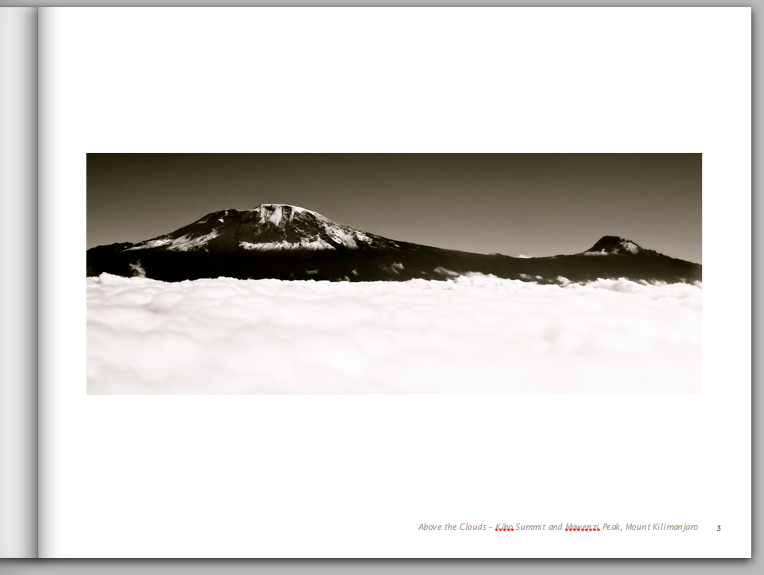
"Modern Lines" theme from my iPhoto book Tanzania
Now – about iPhoto Books…
The advantage of iPhoto books versus online books is that you can work on them without being online: waiting for files to be uploaded, waiting for pages to load, etc. Some online photo book sites have mini apps you download to help prevent this, but I have yet to find them as smooth, seamless, versatile and customizable as iPhoto. With iPhoto, I am not limited to pre-determined fonts and sizes – I can use any font and most sizes up to about 72pt for titles and even 36pt for text. I can also have hard cover books with custom dust jackets – very professional looking! And all of this comes at a very reasonable price: USD 29.99 plus 6.99 shipping (for the first book of multi-book order) for an 8.5×11 20-page, hard cover book with a custom dust jacket (front back and both flaps).
Ordering is a snap using my Apple Account (the same one I have for iTunes music downloads). Shipping is via FedEx. I thought this would be a problem for me here in Canada with merchandise crossing the border, but there are no extra shipping, brokerage or duty charges (SSSHHHHHH – don’t tell the government, but they aren’t even collecting PST and GST!!). And get this – books I upload on a Sunday afternoon arrived at my door here in southern Ontario on Thursday around noon – talk about FAST! I can also track the books online from their origin in the Memphis, Tennessee area. Amazing, truly amazing!!
Making a Book
 Books can be made as easily as:
- selecting the photos in iPhoto;
- clicking on the “Book” icon at the bottom of the iPhoto window;
- selecting the size and style you want;
 clicking on Autoflow for iPhoto to assemble the photos automatically;
- adding a title and captions;
- clicking on “Buy Book” and inputing your details.


"Formal" theme - from my Lake Superior book
While all of this can be accomplished in as few as 10 minutes, you will need to spend a while longer to truly take advantage of all the custom features. This list will give you an idea of the work flow I use in creating a book:
- Select a few photos and click “Book” at the bottom of the iPhoto window;
- Add more photos by selecting and dragging them from the iPhoto window to the icon of your book in the left panel;
- Click on the book icon in the left panel. Place each photo into the book by dragging them one-by-one from the top “filmstrip” view and dropping each onto an image placeholder(s) on each page.
- Be sure to put the photos into a chronology or in an order that tells a story;
- Choose individual page layouts and a cover layout;
- Choose page background colour or full photo background which can be left as it or lightened to go behind text;
- Edit & crop photos as needed (by double-clicking or selecting “Adjust” at the bottom of the window);
- I tend to edit (colour balance, enhance, drop etc.) all my raw files in Adobe Camera Raw then convert them to full-resolution, highest quality jpegs for import into iPhoto, so they already tend to be optimized.
- If you are shooting jpegs, be sure to shot at maximum size and resolution (minimum compression) so that they may be used as full-sized images in a photo book or calendar.
- Tweak the size and/or view of photos using the pop-up window or by Ctrl-clicking (“Fit photo to frame size” or not);
- Write and format descriptive text for the captions, dust jacket, title page and/or chapter pages;
- Select the font style and sizes for the titles, subtitles and various text elements:
- Click on “Settings” and a whole host of global options is provided; or
- Use Command-T to bring up the font palette – this extremely powerful for setting title and sub-title fonts, font colour and drop shadows (BTW this is a feature not given in iPhoto, but built into the Mac OS yet available for iPhoto);
- Tweaking the descriptive captions;
- Proofread;
- Proofread again (preferable by someone else and/or from back to front);
- Proofread and check for the last time (seriously – any errors are forever!).
If this isn’t enough customization, you can even switch themes if the one you’ve chosen is not working for you. Before you do so, though, I would suggest duplicating your current book (select the book in the left column of iPhoto > Control-click to get the pop-up menu > choose “Duplicate”). That way if layouts or type are messed up in the change (due to differences in layout from theme to theme) you won’t lose the hard work you’ve put into the book thus far.
The trick with iPhoto is to spend some time playing so that you get to know all the possible features. In fact, I would suggest choosing 20 or so photos at random and creating a “Practise Book” first. Make all your mistakes there while learning the skills to produce a truly beautiful book. Good luck and have fun! The results will be truly rewarding.
dpReview Challenge – My Own Backyard
Be sure to vote on the submissions to my latest dpReview Challenge in the Art of Nature Series: My Own Backyard. There are some truly beautiful images submitted from around the world.
Isn’t “digital archive” an oxymoron?

Oriel Window, William Fox Talbot. The 1835 original paper negative.
Has anyone stopped to consider that digital storage and archive technologies are incongruent with modern business practices that include obsolescence – planned or otherwise?.
The interesting thing about archaic things like books, is that they can still be viewed and read centuries after their creation. While some require translation from Latin, Olde English/French/German to modern languages, the books can still be easily viewed without any technological barrier beyond a pair of cotton gloves. Consider this – if you had written your magnum opus 25 years ago and saved it to the most up-to-date technology of the time- a 5″ floppy – you would not be able to read it today. It would be effectively lost and almost unretrievable except through great expense. If you had printed it on paper – you would still have it today and for centuries in the future.
What ever means we use today for digital archive is on a pathway to oblivion within, perhaps, years to a decade. Take format, for example: do you own anything that will read a 5″ floppy from the 1980s. You might still have a 3.5″ floppy reader from the 1990s – but for how much longer will it be supported? Even large corporations don’t have 5″ floppy technology.
For sake of argument, let’s say you have the hardware to read old floppies, how about the application needed to read old files? It’s bad enough even today that anything saved in WordPerfect or Microsoft Works cannot be read by most word processing applications. What about word processing apps that are now defunct? – ClarisWorks comes to mind. Even older versions of the omnipresent Word can prove difficult to open and read.
Now, add to this the rapidly changing operating systems, drivers and apps that are not carrying forward the code for older models of computers (and just as well as OSs become quite bloated, otherwise). Perhaps its the drivers more than anything that will prevent users from plugging old technology into new. Take my 1999 scanner – it’s still as good as anything out there because I’ve grown with it in my knowledge of how to scan effectively. However, there will come a time when the drivers are no longer supported by newer operating systems. It will become a piece of electronic junk – ewaste – not because it doesn’t work or is obsolete, but because the manufacturer would prefer that I buy a new one so they stop updating the code needed for it to work.
Let’s face it, our economy depends on us throwing things out and replacing them with “newer and better”. Companies depend on our computers and software becoming obsolete so that we keep buying. This is insane, not just for the environment (we’e all seen the mountains of e-waste), but also for the longevity of digital works.
I’m a photographer. I’m on my third DSLR and looking forward to when 24mp becomes affordable. But, for how long will the applications I use continue to support files made on my first DSLR. Thank goodness Adobe is trying to standardize file formats on the open source DNG file type. But in then end, years down the road, will my hard drives be readable? My DVDs? What I foresee is a constant upgrading of formats that large corporations can afford but the average person or small business has neither the time nor the money for. Democratization through computing dies at the level of the individual – the very level at which democracy is supposed to work.
On the other hand, maybe that’s a good thing. While we all feel we have something to contribute to society at large, most of it is drivel anyway. My concern is that the really valuable stuff that is being saved is being determined by its popularity (you know, all those dreadful Top Ten lists and the kind of crap that sells supermarket tabloids) and not its inherent value for moving society forward in a thoughtful, constructive way. What company has the resources for “thoughtful” and “constructive” when their bean counters are saying “we need popular to maintain our bottom line”. “Thoughtful” and “constructive” are not on the radar of the popular media which survives by selling ad space to the very companies that are perpetuating obsolescence.
So where does that leave us? Is there a company out there that will somehow come up with a digital format that can be made “future-safe” like books and manuscripts are today? I hope so! Perhaps Adobe’s DNG format is the way to go.
iPhoto – How useful is it?
 I use Apple’s iPhoto everyday. I don’t know where I’d be without it. It’s the easiest visual library I have seen and used and, in typical Mac fashion, it is intuitive. Is it perfect? – no, not for all my photography, but it is FREE and fills the library/catalogue niche quite well. I have used Picasa and am teaching non-Mac users about it, but it is a far cry from the elegance and simplicity of iPhoto.
For those you who are Windows users – iPhoto is part of Apple’s iLife suite of applications which come free with every Mac:
- iPhoto for digital photography
- iWeb for creating web sites
- iMovie for digital video
- Garage Band for digital music making
iTunes and iDVD (for creating DVDs) are also free apps that come with every Mac, but they are not part of the iLife suite. Not to confuse you, but there is also iWork – Pages, Numbers and Keynote – which are for intuitive and elegant word processing/page layout, spreadsheets and presentations, similar to Office, but only $79 (USD)
So, how do I use iPhoto and why is it not perfect for me? iPhoto is the ideal app for keeping track of digital photos. It may seem excessive, but I have different iPhoto Libraries based on where I’ve lived and visited – Canada, UK, Europe, Tanzania, South Africa, USA – plus some odds and ends Libraries for clip art and classroom photos. This is how I stay organized – it may not be your routine.

20090811-05-ALM-TheMassasaugaPP
From any iPhoto Library, I can:
- create “Events” – sets of photos from a particular day/trip/occasion;
- create Albums of images from different events;
- find photos using keywords I have assigned. It doesn’t get much easier!
- create slideshows synched to music;
- easily and seamlessly email photos;
- create photo pages in iWeb
- create online galleries for my MobileMe account
- post photos to Flickr or PicasaWeb
- print photos to my printer;
- create stunning slide shows, and
- create very professional photo books.
That’s all from within iPhoto. If I am sending files to WordPress or Panoramio it’s as easy as File > Export. If I want to send images to JAlbum, I just run iPhoto to JAlbum Exporter. I’m sure there is a Facebook export option, too, but I don’t use Facebook. When I want enlargements bigger than my printer can make, I simply export the photo(s) and upload them to FotoSource and pick them up at my local photo shop.
Some background… like many of you, I lead a dual photo life of fine art and travel photography mixed with family photography.
I do all my fine art & travel photography using a dSLR (Olympus E-30) and always, always, always shoot in RAW format (read why here). I process my RAW images through Adobe Camera Raw 5.x. With ACR it’s like being back in the darkroom except I can process photos sitting in my Poang in the family room. I happen to use Photoshop CS4 and Bridge, but ACR and Bridge come with Photoshop Elements which is much more affordable. ACR also comes with Lightroom. (Aside: If I didn’t get Photoshop with my job, I would probably buy Lightroom or Apples’s Aperture, but still use iPhoto).
My family shots are made with a point-and-shoot. These I upload directly to iPhoto where I make any tweaks and cropping that might be needed. I’ve decided to completely by-pass the software that came with the camera. To learn the ins and outs of yet another application is not time well spent. Besides, iPhoto will work with any camera attached, whether it is mine or a friend’s.
So if I don’t process RAW photos using iPhoto – why bother with it? Simple – iPhoto is my digital library where my family shots and my fine art photographs are together in one place and easy to find. I convert the best of my RAW images to full resolution, high quality jpegs which I upload to iPhoto. Now I can easily find them for all the uses listed above. RAW files are large and having everyone of the variations of each photograph takes up a huge amount of disk space. So I keep the processed RAW images stored on an external hard drives and on DVDs and, from time to time I go to them and re-process them as needed. But for the majority of my uses, having a high quality jpeg on my laptop is all I need. All my images are at my fingertips, easy to locate and easy to use – which is the whole point of going digital in the first place – it’s supposed to make life easier and iPhoto does just that. Thanks Apple!
Are their limitations to iPhoto? Of course there are – you can’t expect everything for free! I find ACR better for raw images and iPhoto doesn’t keep track of where the original files are (i.e. on which DVD like some digital asset management (DAM) applications do). But all my images have unique and useful filenames (YYYYMMDD-##-TitleLocation), they are kept in folders with unique and useful nemas (YYYYMMDD-Location) and all my DVDs are labelled. But even with a DAM app, I would need to do all this. So, again, iPhoto fills the niche .
dSLRs and IQ
Where does image quality (IQ) matter? – In the final use of the photo.
So much has been written about megapixels and sensors all in the name of selling more and more equipment. If you strip away all the rhetoric, all that’s left is the simple notion that for 90% of all photographers and photography, sensor size has far less bearing on image quality then any one of a number of other variables including field techniques and post-capture techniques – both of which are deterined by the photographer, not the equipment. Sorry to burst your bubble, but, a better camera does not make better pictures. Today, virtually any dSLR will be more than sufficient for, by far, the vast majority of people buying dSLRs.
It’s unfortunate to say, but the reality of marketing is that consumers buy the latest cameras and megasensors more because they want to be like the “big boys” then for any concrete IQ and usage reasons. Then, endless reviews and forum posts are written to support the IQ/usage notion.
I defy anyone to tell the difference between 4:3s/Olympus and any other make or model of dSLR camera/lens in the following real life scenarios (in order of common use):
- websites (screen resolution obscures any difference and, realistically, only pixel peepers view images online at full resolution)
- regular prints (4×6″ or similar – all that’s needed is 1200x1800pixels for max quality!)
- enlargements up to 11×14″ (no problem!)
- photo books (maximum pixel resolution is about 2000 x 2600 – no problem!)
At this point – 90-95% of all dSLR owners, users and usage have been covered!! The higher-end uses include:
- wedding albums (up to 12″ cropped from a frame – 3600 pixels on longest side)
- magazine images (the dot pattern introduced obscures any IQ difference)
- enlargements to 16×20 (40x50cm) – 4:3s interpolated is, again, amazing quality – especially when viewed from normal viewing distance (Why do some people feel it’s necesary to count pixels in a photograph when we don’t count brush strokes on an oil or watercolour? )
So what does that leave – the 0.1% of enlargements larger than 20″ and even photographs that large can be made from 4:3s sensors with excellent interpolation results.

Maasai Herd Boy, Tanzania
The difference between dSLRs will be in the handling and the system itself, but then that’s where personal shooting styles come in . As well, there are those who require capabilities beyond what Olympus is producing – gazillion frames per second, for example.
I just had the wonderful experience of going through “old” digital files from when I lived in Africa to produce a book. I was using a 5mp Minolta Dimage 7i and I have tack sharp images of my Maasai friends. Enlarged to 11×14 they defy any observer’s guess at sensor size or make. This is just one example of how we have become too fooled by the techno-gazing pixel-peepers rather than making decisions based on how we are using our equipment and what the end product will be.
Bottom Line: Unless you are shooting for e.g. Sports Illustrated or similar, buy what feels right to you because any of the dSLRs currently out there will more than suit your needs. If you are a bit serious about photography then check out the lenses you are most likely to buy: wide-normal zoom, telephoto zoom and perhaps a macro lens. For most people a body and the two “kit” zooms will be ideal – a system you can grow into. Surprisingly, Olympus came to that realization a few years ago – their “kit” lenses are regarded as the best on the market by almost any reviewer out there! So save a few bucks on equipment and spend it on travelling to that dream photo destination.
 luxBorealis Blog