Prime Lenses for the Nikon D800
Once I made the decision to move to a Nikon system and prime lenses, the question became which lenses? From the start, I am a landscape and nature photographer, so my lens choice is dictated by the needs of this type of photography: wide angle lenses to capture the three-dimensional foreground-background style of landscapes I enjoy creating; a close-focussing lens for natural details; plus a telephoto lens for wildlife. For me, that means focal lengths of 20mm, 24mm, 105mm, 200mm and 300 or 400mm.
This is born out by my shooting stats. The beauty of Lightroom is that I can use the Library Filter to see what focal lengths I most common shoot at. One would expect that with using zooms for the last 8 years there wouldn’t necessarily be a strong pattern but, intact there was. By far, the most common focal length for me was 24mm – almost 25% of all images shot! The next biggest spike is in the 100-120mm range, then the 35mm range then the 400mm range.
In creating my “lens road map”, I started by listing the “most desirable” lenses from a technical and image quality perspective. Since much of my photography is done from trails and canoe portage routes, weight is also an issue as I have to carry all this gear, plus a proper tripod. I have always tried to create a system of lenses whereby each lens is 1/2 or double the focal lengths of the lenses on either side of it. This is less true in wide angles as even a few mm difference make s huge difference in angle of view. Traditionally, I’ve worked with 24mm – 50mm – 100mm – 200mm – 400mm.
My “most desirable” list includes in order of importance:
- Nikkor 20mm f/2.8 – ideal for super-wide with strong foreground elements. I have been shooting with 24mm for years and often found that it wasn’t quite wide enough;
- Nikkor 24mm – The f/1.4 version is the crème-de-la-crème for image quality, but it is also very expensive, I will have to settle for the f/2.8 version for now;
- Micro-Nikkor 200mm f/4 – An amazing lens – sharp as a tack and a wonderful working distance. Unfortunately, with it being in the $1500 range, I will have to settle for the 105mm Micro-Nikkor for now.
- Nikkor 300mm f/4 AF-S – A wonderfully sharp lens that’s not too large and heavy, comparatively speaking. It is the f/2.8 version that you see at sports events along with its 400mm f/2.8 bigger brother – both of which are too big and wieldy for hiking and canoeing, so the f/4 is more appropriate. As well, with today’s improved quality at higher ISOs (400 now-a-days compared to ISO 100 in the film days), f/4 will be fine, even with the 1-stop loss if I should add a 1.4x or 1.7x teleconverter. Furthermore, with the D800 set to DX mode (still with 15MP of real estate), the 300mm becomes a 450mm without a teleconverter.
Whether or not these are AF-D or AF-S was of little importance to me as both versions are technically sound and in many cases optically identical. The 300mm is not available in AF-D (only the earlier AF) so, the AF-S is one for me.
After a couple of weeks of buying and selling on eBay and Kijiji, I’ve ended up with the following – not quite ideal, but a healthy start that will allow for further expansion and changes:
- Nikkor 20mm f/2.8 AF-D – Perfect and the first lens I purchased;
- Micro-Nikkor 105mm f/2.8 AF-D – A great start for macro work and it’s a lens that keeps its value;
- Nikkor 28mm f/2.8 AF-D – not ideal, but I bought it along with the 105mm (and 50mm) and it will help “fill the gap”. Anyone want to trade for a 24mm?? (email me! – I’m serious!);
- Nikkor 50mm f/1.8 AF-D – again, not ideal, but it fills the gap for now.
- UPDATE 16 May 2012 – Just added a 300/4 AF-S – a spectacular lens – read more…
This gives me an appreciable range now with the top end – yet. More importantly, these lenses appear to be better built than the zoom I used to carry around and, while a bit heavier overall, each is more agile than the zoom. Yes, I will need to switch lenses more frequently and my system won’t look as “professional” with a big honking zoom out front with the petal lens hod, but I certainly won’t be suffering from any “lens envy” that others might feel with the smaller primes 😉
A new beginning with a Nikon D800e
Over the past six months, various aspects of my photographic and non-photographic life have caused me to think hard about where I am going with my photography and the equipment I am using.
Up until 2004, I was an ardent film user having started my photography in 1977 with a Praktica camera. My first serious system was a Minolta with their wonderful lenses. Eventually I “graduated” to a Nikon FM system with Nikkor lenses, but, upon moving to Pentax 67 (selling my Nikon gear to purchase the medium format system), I began using my wife’s Olympus system which I have stayed with all these years. The OM system with its small bodies and prime lenses was ideal for carrying alongside my 4×5 system which I began using in the mid-1990s for my serious work.
In 2004, I made the leap and bought a digital SLR. I agonized over the decision and lamented the fact that my Olympus lenses would not work on their new line of 4/3s DSLRs. However, Olympus once again won out as I could get the full range of focal lengths from 28mm to 400mm in two zooms that also had the same filter size – an ideal kit for travelling as by that time we were living and working overseas. It meant giving up my wonderful prime lenses, but zooms made sense at the time. Not long after returning to Canada I upgraded that system to a 12mp body with a zoom that finally allowed be to reach 24mm – my personal “sweet-spot” for landscapes. In fact, the 12-60mm f/2.8-4 (24 to 120mm equivalent in 35mm terms) was one of the finest zooms ever made – a brilliant range for the nature and landscape work I do.
But alas, the writing was on the wall. With Olympus’ new “flagship” E-5 only carrying 12mp (although a very sharp 12mp), the 4/3s system was quickly being out-paced by APS systems and Olympus began putting its efforts into mirrorles-4/3s. Many argue that it’s not megapixels that make an image and they are absolutely correct for the vast majority of photographers. However, I come from a 6×7 and 4×5 background where image quality and every little detail is absolutely essential.
The second big revelation came back in September of 2011, when I finally began doing some serious printing again after a 12 year hiatus. This meant re-tooling and relearning having spent more than 2 decades in the darkroom creating both black-and-white and colour prints. I don’t care what anyone says – a 12mp sensor simply does not hold up on a 17″ print, especially when I am trying to express the amazing detail found in grand landscapes. That being said, I have 5mp images that look stunning in large prints and many 12mp images that look even better, but they are few and far between and suffer from image breakdown upon close inspection.
With my photography moving more and more into fine art prints, I knew it was just a matter of time before my work would begin to take a back seat. Besides, if I am going to invest time and energy into getting myself in the right place at the right time, I want the resulting digital files to be worth it. Yes, I could just pick up my 4×5 and start shooting film again and scanning it, but the beauty of digital is just so tantalizing. The Pentax D645 with 39mp was just about ideal for this kind of work but it started at $10,000. The same-sized Leica system was also ideal but even $30,000 would’t be enough to do it justice.
With the demise of the 4/3s system and my quest for ultimate image quality at a price I could afford, I began looking seriously at the Sony ∝900 and 850 bodies and the wonderful Zeiss zooms available for them. But even those cameras began to look outdated. Word began spreading of a new Nikon body with megapixels galore. Really – 36mp! You’ve got to be joking!
Meanwhile, my brother Charlie who lives and photographs down in Naples, Florida helped to bring me back to my photographic roots when he sent me a booklet and calendar showing the work of Clyde Butcher. If you’ve never seen his work, think Ansel Adams in the Everglades. Amazing – you must visit Clyde’s website! His vision in making gorgeous photos of his “home turf” has re-kindled my desire to do the same here in Ontario.
So, now I’m thinking – while I’ve done some very rewarding work with zoom lenses, I enjoyed photography even more when shooting 6×7 and 4×5 (and 35mm) on a tripod with prime lenses. There is something about prime lenses and working on at tripod that makes you slow down, think and look a lot more closely. It’s not that you can’t do that when hand-holding a zoom lens, it’s just that with primes and a tripod, a certain discipline develops and that discipline of careful thought and placement and composition begins to seep into all areas of the craft and vision of photography. I, for one, benefit from that discipline.
Thus, the various alignments of the demise of 4/3s, the move to fine art prints, the arrival of a breakthrough, full frame 36mp DSLR and my recommitment to prime lenses have resulted in this new beginning. Over the past week or so, I have begun that metamorphosis by purchasing a variety of Nikkor prime lenses and selling my Olympus gear (thanks eBay and Kijiji). The metamorphosis will be complete when I begin shooting with the Nikon D800e that is currently on order and not yet available. Hopefully, my name isn’t too far down the list that I won’t be waiting too long to take delivery.
I have scoured the ‘Net for professional opinions of these new, ground-breaking DSLRs. Everyone who has used one arrives at the same conclusion: the D800 and D800e are truly game-changers. They bring what was once only possible with a minimum $15,000 investment into the hands of photographers like myself for whom that kind of expenditure was simply out of the question. In many ways, the Nikon D800 represents a democratization of image quality like we’ve never seen before.
Check out the Internet and you’ll see all the usual splash about new cameras on dpreview.com, but two things have helped me most in making up my mind. First were the numbers posted by DxOmark.com – a whopping 95 for the D800 – better than any camera of any sensor size, right up to 180mp. Phenomenal. While this is only a measure of the sensor, for me it was the D800’s amazing dynamic range of 14.4 stops that counts most – ideal for the kind of nature and landscape work I do. (In comparison, my E-30 scores 55 and the E-5, 56; the Pentax D645 scores 82 while the Sony 900 scores 79.)
The second bit of help I had in making this decision came from a photographer whose work I have greatly admired for many, many years – Jim Brandenburg of National Geographic fame. His 20-minute interview with WhatDigitalCamera.com and his work for Nikon on this project was a revelation. Granted, he would be a bit of a fan-boy as result of his close association, but, given his reputation, I’m sure he’s also not one to jump on a bandwagon that doesn’t have a solid foundation.
So, consider this my first post on the Nikon D800e. I will add more as I continue this exciting new beginning…
Note: Call it serendipity, but having sold my two Olympus zooms yesterday, just as I was writing this post, my E-30 sold on eBay. I am now completely divested of Olympus (yes, with a tear in one eye), but am now looking forward with even greater anticipation to the next week or so.
Winterly Haiku – Andrei Baciu
I love “discovering” new ways of seeing through the eyes of other artists. This morning I was captivated by the work of Andrei Baciu from Romania. You must have a look at his Gallery Winterly Haiki.
I discovered his work through my subscription at LensWork Online. Brooks Jenson, publisher of LensWork magazine (the premier periodical for the art of black and white photography), has also created this parallel community where just about all of LensWork is shared online – including Readers’ PDF Galleries, where I first saw Andrei’s work beautifully presented in a PDF gallery.
The beauty of Andrei’s work is in its simplicity. I have no idea what camera system he is using to create such beautiful photographs, but it could be just about anything. He has pared each scene down to its minimum to allow the negative space itself to speak. If you are serious about photography – have a look at his work as it is a reminder to us all that it’s not pixels that speak, it’s the poetry of the image.
Lightroom 4 – Continued success!
I am certainly enjoying the new Basic panel of Lightroom 4. Yes, it takes some getting used to, but my results so far have always been an improvement over what I could achieve with Lightroom 3.
The biggest difference I find is how much more precise the adjustments are to specific tonal regions. The best example is in the Exposure adjustment – it really does a wonderful job on the mid-tones without adding highlight clipping with increases or shadow clipping with decreases in exposure. This is at it should be.
Furthermore, the Highlight adjustment does a superb job with the high 3/4 tones without introducing highlight clipping – again, wonderful. The same can be said with the Shadows – I can open up shadows very nicely and much more precisely than with LR3.
Something else I’m finding, is that LR4 is much better at handling slightly clipped Highlights. In typical Expose-to-the-Right fashion, when shooting raw I slightly clip my Highlights to achieve slightly greater dynamic range. LR4 tames those Highlights much more smoothly than previously.
As a result of these improvements, I find I am reprocessing more and more of my LR3-processed images (Process Version 2010) to PV2012. However, in doing so, I don’t like what LR4 does in attempting to match what PV2010 did. I found that I needed to “zero” the Basic palette adjustments (not the masks, though, not th lens corrections, so “Reset” is not an option) and start over. Not a problem as the results were better than what I had previously, but it does mean spending a few minutes tweaking the Basic adjustments. To do the “aerating” easily, I created a Develop Preset called “Zero after PV change” – one click and the Basic palette adjustments are zeroed and ready for me to work with.
One caveat – Speed: LR4 is slower on my MacBook Pro 2 GHz Intel Core i7 with 8 GB 1333 MHz DDR3 RAM. I notice a lag with switching modules which is annoying. Also, with some adjustments there is a lag.
Lightroom 4 – What’s the big deal?
The big deal is this – Soft Proofing, Books and Maps are a great addition to Lightroom, but for me, the great leap forward is in the new Basic palette of the Develop module.
Once you have converted your Lightroom 3 catalogue to Lightroom 4, you will not actually see a difference. The new palette is invoked only when you convert from Process Version 2010 to Process Version 2012. Here’s how it works…
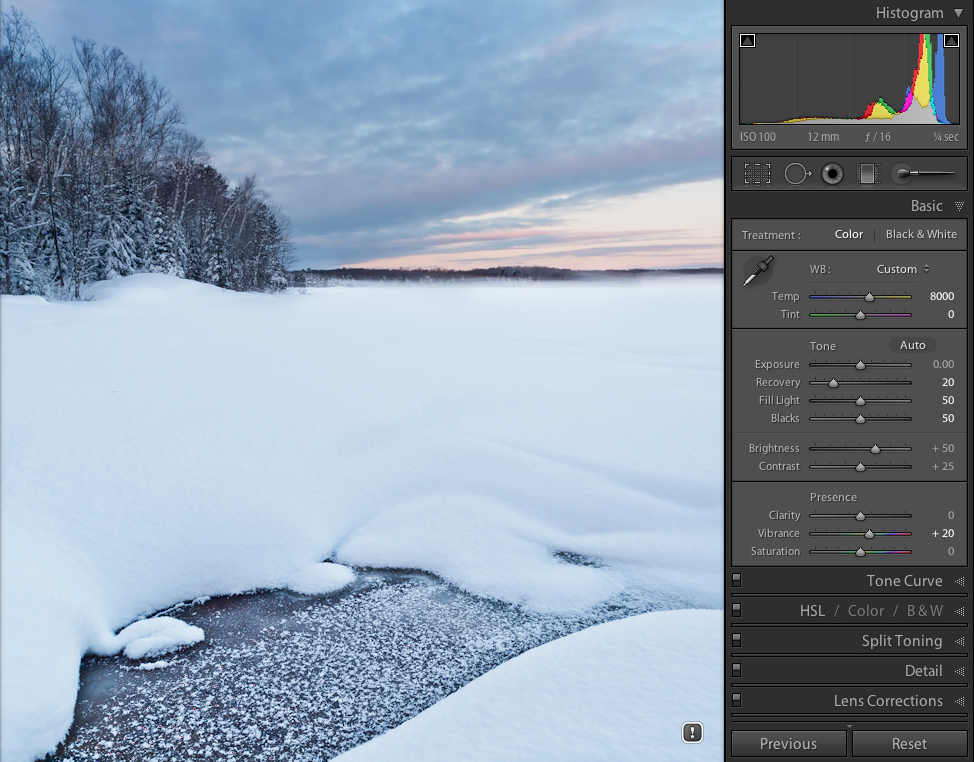
Process Version 2010 - as per Lightroom 3
Open Lightroom 4 and take a look at a photo you have previously processed in LR3. You will see the same LR3 Basic palette – nothing has changed there, yet. Do you notice the small grey exclamation point icon in the lower right? Click on it and you can choose to convert that photo from PV2010 to PV2012. You can also convert all the other filmstrip images at the same time and even compare with a before and after. To start, just convert the one image. After a moment, you will see a slightly different version of the same image plus a new Basic palette.
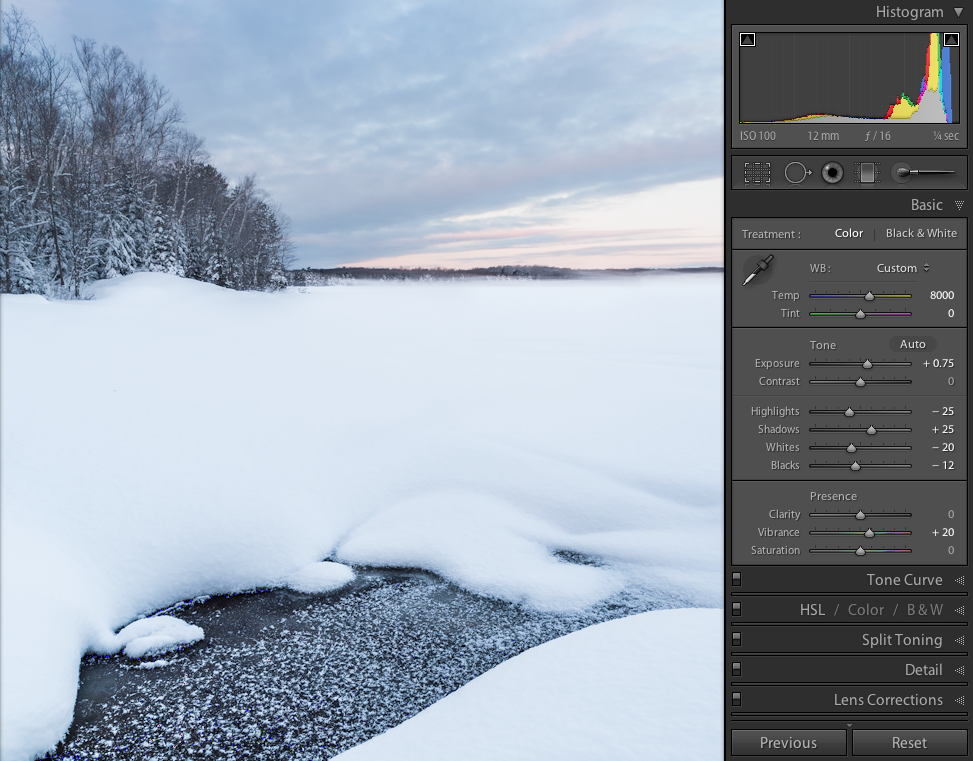
Process Version 2012 - as per Lightroom 4
At the side are examples of the same photo in PV2010 and PV2012.
LR4 attempts to “convert” the PV2010 version to a somewhat equivalent PV2012, but the conversion is rarely exact and it may not even look like an improvement – not yet anyway. This is where the magic begins. There is no direct conversion from PV2010 to PV2012 since the adjustments in LR4 are much more precise to specific tonal regions within a photograph. For me, this wonderful! In fact, what I am finding is that when I “reprocess” previous images using LR4 and PV2012, I end up with much livelier mid-tones. Images have much more “presence” without reporting to Clarity or Tone Curves.
The trick is to nail down Exposure first. The Exposure adjustment has the most effect in the middle tonal values (in the middle of the histogram). In fact, if you hover your cursor over the Exposure slider or value field, you will see the central region of the histogram turn a shade lighter in grey to show the region most affected. The same is true as you drag your cursor over the other adjustments. The only that does not do this is the Contrast slider – it spreads out the histogram to either side evenly.
What’s most important, however, is how well the extreme highlights and shadows are “protected” from becoming clipped. In PV20102, it seemed that only a slight increase in Exposure would cause the Highlights to become clipped. The Brightness adjustment was better for preventing clipping. But in PV2012, it seems the Exposure slider is non-linear meaning that it’s greatest effect in the central part of the histogram with a progressively smaller effect towards either end – perfect!!
The Highlights, Shadows, Whites and Blacks adjustments are equally “zoned” into specific regions. They work like having point curve in Tone Curves – the level of precision is much greater and the “drift” int other zones is much less. As well, with Highlight and Shadow clipping better protected, I can make more significant changes without losing either end.
Why am I using the word “zone” so much? Well, for those of you old enough to know the zone system, it’s like being able to adjust the tones within different zones of the histogram, only it is much more precise than we were ever able to achieve with N- and N+ exposure, development or printing.
I’m finding that whatever I did using PV2010, I can do better in PV2012, but that creates a dilemma. I simply do not have the time to go back and reprocess every PV2010 image. Instead, I’m reprocessing as the need arises for printing purposes and for posting to the web.
For me, this change in the Basic palette is the single most important improvement in LR4. I must admit to being disappointed in the lack of improvements in other areas such as the now totally pathetic spot removal brush (when compared to what Aperture has had for years now, not to mention Apple’s free photo app, iPhoto). I was also hoping for a better “Transform” feature similar to Photoshop. As well, I thought Adobe could to a better job in providing more options in the Web Gallery such as graphic backgrounds instead of just plain colours.
Be that as it may, LR4 is still an improvement over LR3 i the most important area for digital photographers – in the processing of our photographs. Once you start working in PV2012, you’ll start to wonder how you got on without it!
 luxBorealis Blog