Kodak Photo CDs—OMG!
Hands up if you have negatives or slides from the last century scanned to Kodak Photo CDs. Hands up if you even know what a Photo CD is. How about negatives? Slides?
Right. I’m talking ancient history to some of you—the pre-digital era. But that’s okay. Read and learn about the hazards of legacy file formats by manufacturers and processes that no longer exist!

I was heavily invested in film photography from the mid-1970s right through to the early 2000s and have thousands of 35mm slides, 6×7 and 4×5 transparencies. However, back then, I took advantage of slide scanning tech offered by Kodak (who? you ask!!), to preserve my slides forever as digital files. So I have about 300 of my best slides from then, scanned to 3 Kodak Photo CDs. The trouble now is I can’t ‘read’ them. Neither my current MacOS nor Photoshop2024 can read PCD files. The Photo CD disk could be read by the Finder, but nothing I tried would open the file and, over the years, I’ve developed a few tricks and workarounds for file formats. Nothing I tried worked! Yikes!
Needless to say, this started a hunt for some way to convert all those ‘great’ slides to a format that could be read. Enter GraphicConverter. I had totally forgotten about this app—one that I used extensively at the beginning of the computer era—for manipulating images and saving to different file formats. It is still around, in version 12, and guess what? It works!!!
It’s nice that GraphicConverter is a shareware app. You can buy it directly from the Apple App Store, but even better is downloading from the provider, Lemcke Software, to try it first. If it works for you, then you can pay them. No obligation and no up front payment information—just download and go.
I really like the way I can batch convert either through the drag-and-drop option (pictured) or through the usual interface. I can also select from a number of different file formats for saving (though DNG is not supported), and I can easily specific which folder to save it to. In ten minutes I had 94 PCD files converted to PSD and added to Lightroom CC.
The only downside is that the new Denoise AI technology is not compatible with PSD files (not yet, anyway). Nor will it work on JPEGs or TIFFs, only raw files. But that’s only a mild set-back. BTW, I saved to PSD file format as it was almost half the size of a TIFF (19mb vs 34mb). I would never convert to a JPEG as I would lose too much important data for post-processing, which is definitely needed for these files.
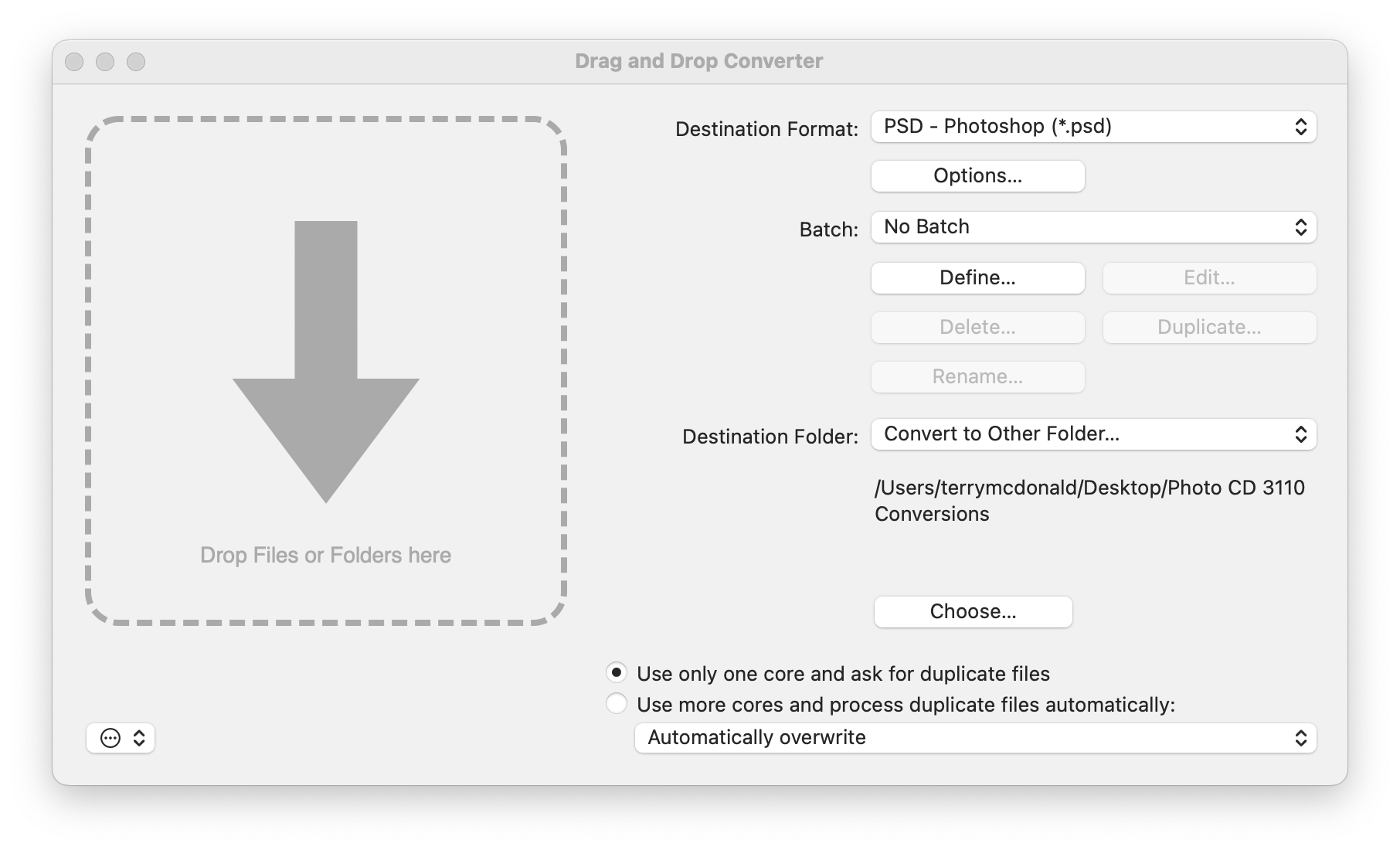
GraphicConverter is far more powerful and has far more options than I will ever need. However, it solved the problem I had of converting Kodak Photo CD PCD files to something I can work with, like Photoshop (PSD) files. Furthermore, GraphicConverter works with Apple Silicon Macs (i.e. with ‘M-series’ chips) and, more importantly, it does a very good job of keeping whatever highlight information is encoded in the scan. Other file conversion apps do not, so be wary of alternatives. Note that is you have an older Mac, you can download GraphicConverter 10.
THIS—the Finder window on the left—became THAT—the photo I was hoping to open and work with in Lightroom.


Success! Now, if only I had sprung for the extra resolution on the Kodak Photo CD. They offered a ’64-base’ 4096 × 6144 file size. The file size of these are the standard 16-base, 2048px by 3072px, or about 6mp. But, back in the early 2000s this was plenty big enough. In fact, it was larger than professional digital SLRs at the time—the Nikon D1 was just 2.7mb!! With cropping of the slide mount edge it works out to about 2000×3000, just large enough for a 7×10″ or thereabouts.
Thanks for reading!
If you have any comments questions or suggestions about file conversion, Kodak Photo CDs, PCDs, DNGs or PSDs, please add them to the Comments section. I also appreciate it anytime you can share my blog post with other photographers or within your camera club.
If you are not yet a subscriber, then consider adding your email up at the top to be instantly alerted to new blog posts. And I promise not to inundate your inbox.
Have a look at my work by visiting www.luxBorealis.com and consider booking a PhotoTalks presentation or workshop for your Photo Club or a personal Field & Screen workshop at Workshops.
Discover more from luxBorealis Blog
Subscribe to get the latest posts sent to your email.
 luxBorealis Blog
Does Graphic Converter work on a Windows machine?
Hi Don,
While GraphicConverter only works on a Mac, there is a very good thread in the Adobe Community blog (https://community.adobe.com/t5/photoshop-ecosystem-discussions/is-there-any-software-available-to-open-old-kodak-master-and-pro-scan-cds-and-dvds-of-scanned-film/m-p/14243694) that recommends Irfanview: https://www.irfanview.com/. Have a read of that thread for more details.
—Terry
Thanks Terry. I did some hunting on the internet yesterday and came across a program called pcdmagic, which converted my PCD files on a couple of Kodak discs to .tif format. The free version leaves a watermark on the images, but I found out that the Photoshop remove tool does a good job in removing these watermarks, sufficient for my purposes but not likely good if one wants to print large. I only ever had two photo cds made, and I feel the cost they want for a paid version is not justified for me.
That makes sense, Don. Thanks for sharing. For those following this thread, PCDMagic appears to be $79 (I assume USD) and is available for both Windows and Mac. It is the premier app for converting, but as Don explains, it’s not free without the watermark.